
Laboratory and imaging
Results arrive from the machine, not a keyboard.
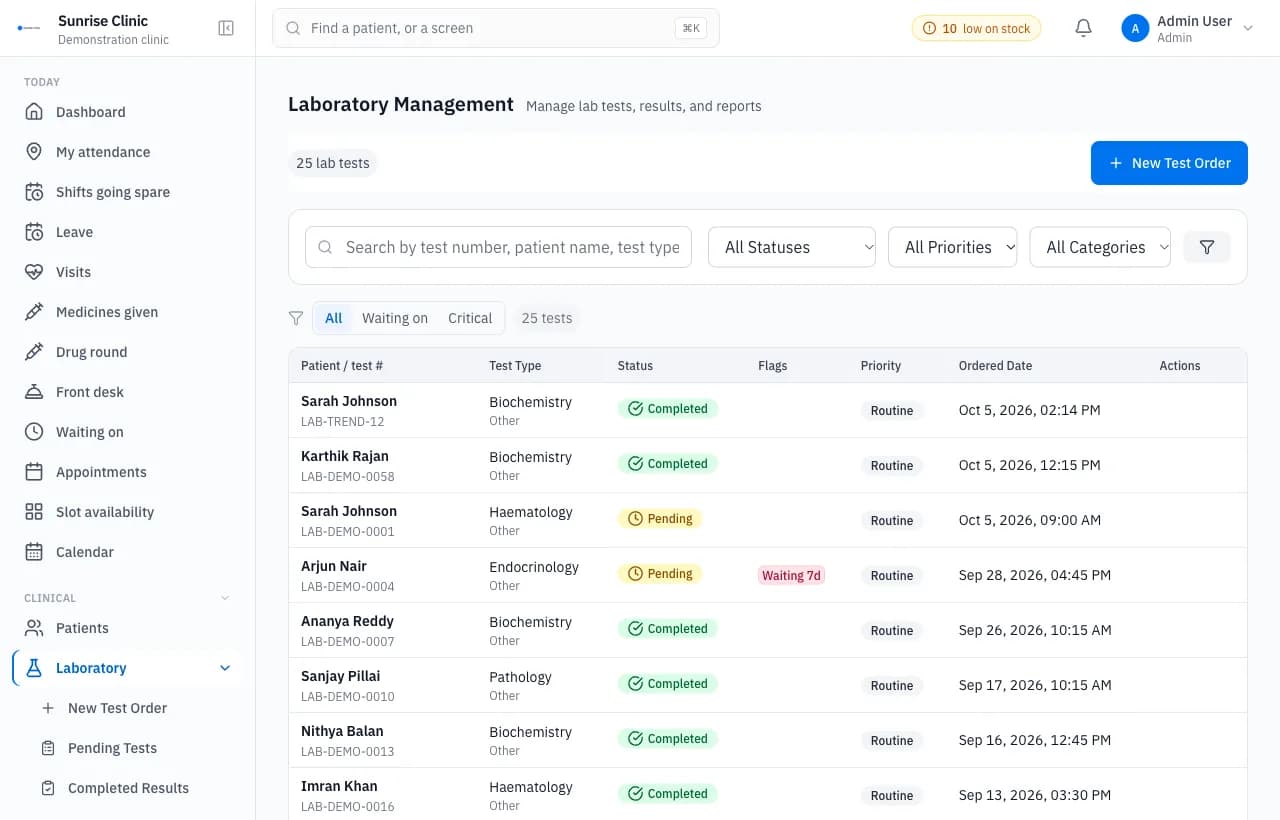
The laboratory and imaging module manages lab orders from sample collection to result, and radiology studies with impressions. Analyser results arrive over HL7, ASTM or FHIR instead of being typed in.
Used by: Laboratory technicians, radiographers and pathologists.
What it does
- Analyser results over HL7, ASTM and FHIR through one path.
- Lab orders with sample collection, progress and critical flags.
- Radiology studies with impressions, and images received from the modality.
- Results kept as the analyser wrote them, with a numeric projection beside them for charting.
How a lab order moves
A doctor orders a test from the consultation, marked routine, urgent or stat. The order carries its own number and moves through four steps the whole lab can see: pending, sample collected, in progress and completed. Tests are grouped as haematology, biochemistry, microbiology, immunology, pathology and urinalysis.
The price is copied onto the order when it is placed, so a later change to the price list does not rewrite an old bill. A test with no price set is left off the invoice rather than billed as free, which keeps a missing price visible instead of hiding it as a zero.
Analysers that talk to the system
Most analysers already speak one of three standards, and QClinicOne listens for all of them. HL7 version 2 arrives over TCP with MLLP framing. ASTM arrives over TCP with the ENQ and ACK handshake older instruments expect. FHIR R4 Observations, DiagnosticReports and Bundles arrive over HTTPS. Instruments that do none of these can post results to a REST endpoint.
Every protocol ends in the same place. A result from an HL7 haematology counter and one from an ASTM chemistry analyser are processed by the same code, matched the same way and stored the same way, so adding a new instrument does not mean a new set of rules.
The device list shows each analyser, when it last sent anything, whether it is online and how many results it has sent today. A silent analyser shows up on the screen before anyone notices the results have stopped.
When a result does not match an order
The analyser sends the sample number, and the system looks for the open order with that number. One match and the result is attached to it. Two possible matches and the result waits with both candidates listed. No match and it waits on its own.
Nothing is thrown away. Every result is kept with the message exactly as the instrument sent it, and the ones that could not be placed sit in an incoming queue where a technician attaches them by hand. A result that arrives before its order was keyed in is a common morning problem, and this is where it ends up rather than in a log nobody reads.
Out of range and critical values
Where the analyser flags a value high, low or critical, that flag is kept. Where it sends no flag, the critical limits set for that parameter on the device are applied instead. When a technician enters a result by hand, the server compares the value with the normal range itself, so a haemoglobin of 9.2 against a range of 12 to 16 cannot be saved as normal because a dropdown was left on its default.
When an order is completed with a result outside its range, the staff on that branch get an alert naming the patient and the test, marked critical where it is. Normal results raise no alert, so the one that matters is not buried among the routine ones.
Imaging
Radiology studies are ordered for X ray, CT, MRI, ultrasound, mammography, fluoroscopy, PET and DEXA. Images arrive from the modality over DICOMweb and are matched to the study by accession number or patient ID, with an incoming queue for the ones that cannot be matched, the same as the lab.
The images open in the browser, with no separate viewer to install. The radiologist writes findings and an impression, and the report is verified, with the name of whoever verified it and when.
Questions buyers ask
Can our lab analysers send results directly?
Yes. Analyser results arrive over HL7, ASTM or FHIR through one path, so technicians do not retype them.
Is the original analyser result kept?
Yes. The result is stored as the analyser wrote it, with a numeric value kept beside it for charting.
Further reading
- Connecting lab analysers over HL7 and ASTMWhat a lab needs before analyser results flow into the hospital system: the protocol, the sample ID, test code mapping, and what happens to unmatched results.